
A customer calls to say that a truck cannot be unloaded at the agreed time. For a dispatcher, changing the unloading time is the easy part. The real problem is working out whether the vehicle can still complete its next transport job as planned.
If the dispatcher updates only the unloading time, the rest of the transport plan may no longer reflect reality. The next collection remains scheduled, the customer expects the vehicle to arrive on time, and a delay at one warehouse can turn into a problem for several customers.
Establish when the vehicle will actually be available
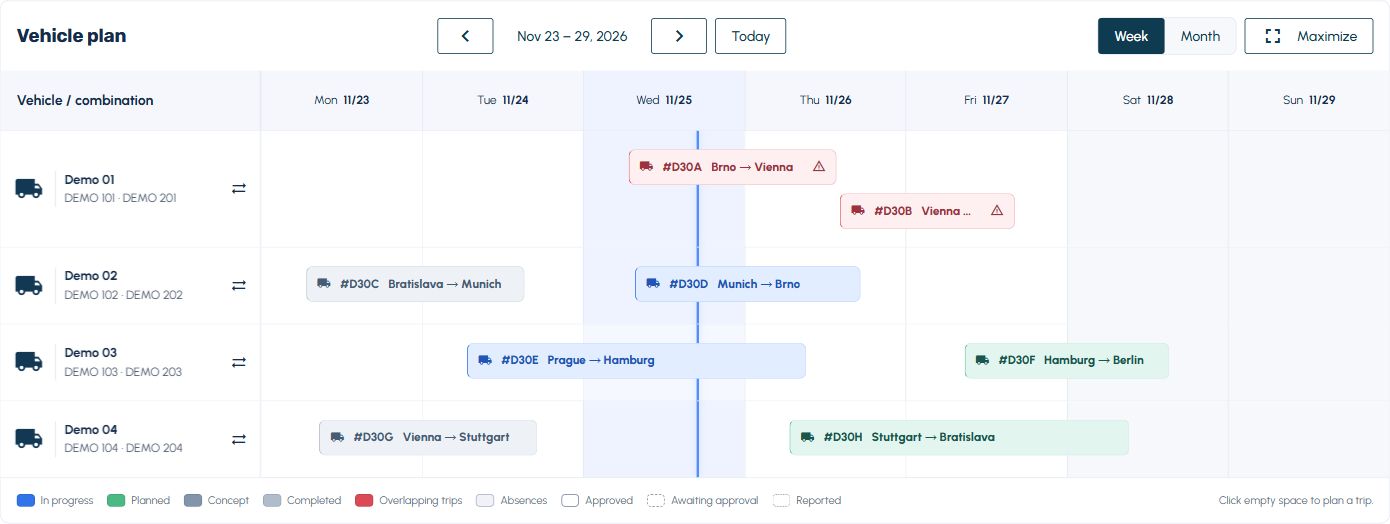
Consider a fictional example. A dispatcher has assigned truck Demo01 to trip D30A from Brno to Vienna, departing on 25 November at 06:00. Unloading is scheduled for 09:00 the following morning, but the customer moves it to 14:00.
Before changing the plan, the dispatcher needs to establish what 14:00 actually means. Is it the new arrival time, the unloading appointment or the expected completion of unloading?
In this example, unloading is expected to begin at 14:00 and take 30 minutes. The vehicle is therefore expected to be ready at 14:30 on 26 November. This is still an estimate, not a guaranteed departure time.
Check the next transport job assigned to the vehicle
The same truck is already assigned to another agreed trip, D30B, from Vienna to Prague. It is scheduled to start at 13:30 on 26 November and finish at 17:00 on 27 November.
The truck is now expected to finish its first trip an hour after the second one is due to begin. Even if both unloading and collection take place in Vienna, the vehicle still needs time to travel between the two locations.
The dispatcher should also account for the expected loading duration and check whether the driver is available and has sufficient driving and working time, including any necessary breaks and rest periods.
Two trips that do not overlap on a calendar can still be impossible to complete as planned.
Decide how to handle the scheduling conflict
The dispatcher should first update the unloading appointment and the expected finish of the current trip. The next trip should retain its agreed time until a different arrangement has been confirmed.
There are two practical options. The dispatcher can check whether another vehicle from the company's own fleet is available or contact the customer to agree a later collection time.
Using another vehicle requires more than finding an empty space in the calendar. The replacement truck and trailer must be suitable for the load, and an available driver must be able to reach the collection point on time.
If no suitable vehicle is available, the dispatcher needs to establish whether the customer can accept a later collection. Moving an appointment in the transport plan does not mean the customer has agreed to it.
Once a decision has been confirmed, the dispatcher should inform the affected driver and customers of the relevant changes.
Make scheduling conflicts visible in the vehicle plan
Keeping individual transport jobs in separate documents makes it harder to see how a change affects the rest of the day. A shared vehicle plan brings these jobs together.
In Moveniq's transport management system for carriers, dispatchers can record the assigned vehicle combination, driver, stops and planned arrival and departure times for each trip. The vehicle plan groups trips by truck in a weekly or monthly calendar. When recorded trip times overlap for the same vehicle, the affected trips are highlighted in red. In our example, updating the planned finish of D30A makes the conflict with D30B visible. The dispatcher can identify the problem without having to compare each trip separately, but still needs to decide how to resolve it.
Keep the transport plan aligned with confirmed arrangements
Once a solution has been agreed, update both the affected trip and any subsequent work whose timing or vehicle assignment has changed. Check whether any appointments or vehicle arrangements are still awaiting confirmation.
The aim is not simply to remove overlapping entries from the calendar. It is to maintain a transport plan that the company can actually carry out.
Before considering a scheduling conflict resolved, the dispatcher should know which vehicle will carry the next load, when it will be available and whether the confirmed collection arrangements allow the job to go ahead.