
A driver is on the way to a delivery when the customer calls. The unloading time has changed. The dispatcher needs to check whether the vehicle can still complete its next job, agree on a revised plan and make sure the driver receives the correct instructions.
This is where the difference between dispatch software and a transport management system (TMS) becomes important. Both can help a haulage company manage its daily work. The question is how much of that work needs to be connected.
What is dispatch software?
Dispatch software helps a transport company organise and assign work to its drivers and vehicles. Depending on the product, dispatchers can plan jobs, manage schedules, record assignments and follow their progress.
Some dispatch systems go considerably further. They may include transport orders, documents, costs and other functions commonly associated with a TMS. The term "dispatch software" does not mean that a product is necessarily basic or limited.
What does a TMS do differently?
A transport management system covers a broader part of the transport operation. Rather than concentrating mainly on assigning and scheduling jobs, it can connect transport orders, vehicle planning, trip information, costs and documents.
For example, a dispatcher may need to know not only which vehicle is carrying a load, but also what the customer requested, which delivery instructions are current, what the transport is expected to cost and where the relevant documents are stored.
However, the name TMS does not guarantee that every function is available. Some products focus heavily on planning, while others include extensive financial or administrative tools. Dispatch software and TMS products overlap, so their actual capabilities matter more than their labels.
When is dispatch software enough?
A dedicated dispatch tool can be a good choice when the main challenge is organising vehicles, drivers and their daily assignments.
Consider a haulage company whose dispatcher plans work in one system while the office handles documents and financial records elsewhere. If employees can reliably find the information they need, and changes are communicated without confusion, there may be little reason to replace that arrangement.
Company size alone is not the deciding factor. A business operating many vehicles may have a straightforward planning process. Another company with fewer vehicles may handle complicated journeys, frequent changes and substantial paperwork.
What happens when a delivery plan changes?
Consider this hypothetical example. Martin manages several vehicles for a haulage company.
One vehicle is assigned to a morning delivery, followed by another job later that day. Martin has already agreed the plan with the driver.
The customer then informs Martin that unloading will take place later than originally arranged.
Martin checks the vehicle's next assignment to see whether the revised unloading time creates a conflict. He contacts the relevant parties, confirms what is still possible and gives the driver updated instructions.
With separate tools, Martin might update the planning calendar, change the job information elsewhere and send a message to his colleague explaining the new arrangement. Each step depends on him remembering where the information is kept.
With a connected transport workflow, the current job details and the vehicle's following assignments can be easier to review together. Martin still needs to make the decision and communicate the confirmed plan. The advantage is that colleagues have a clearer place to find the latest recorded information.
How can Moveniq support carrier dispatchers?
Moveniq for carriers brings vehicle and trip planning into a shared working environment. Dispatchers can work with vehicle combinations, drivers, planned trips, stops and operational information, alongside transport cost information.
Its vehicle plan displays trips grouped by vehicle, with planned times. Dispatchers can use weekly and monthly views to see upcoming work and overlapping plans.
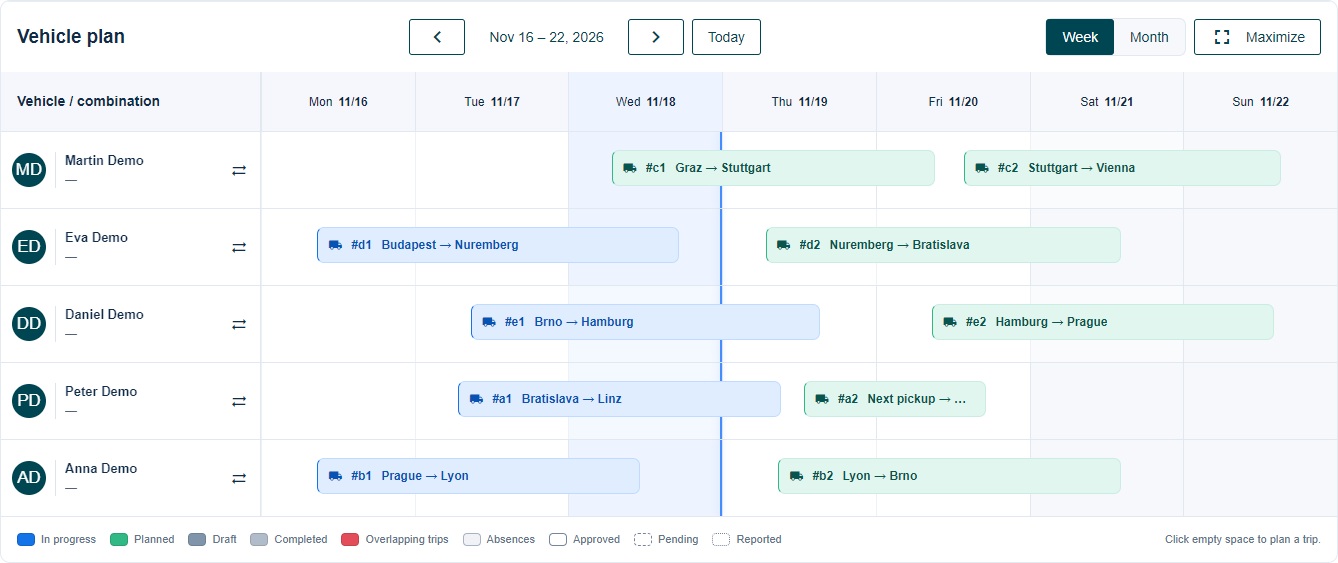
In Martin's situation, the vehicle plan would help him see the next planned trip before deciding how to handle the changed unloading time. It does not mean the system automatically rearranges the schedule or confirms that the revised journey is feasible. Those decisions still require the dispatcher.
Which approach makes sense for your company?
If your dispatchers can assign jobs, manage changes and keep colleagues informed without difficulty, focused dispatch software may be sufficient.
If every change means checking several records, repeating updates or asking colleagues which information is correct, a more connected transport management system deserves consideration.
Before changing software, look at how an ordinary job moves through your company. Who records the order? Who assigns the vehicle? What happens when the customer changes the instructions? Where can colleagues find the current plan, costs and documents?
The right system is the one that makes those everyday tasks easier to manage. Whether it is called dispatch software or a TMS matters much less than whether everyone can work from reliable, up-to-date information.