
The customer order is recorded in the ERP. The invoice will eventually be created there too. Yet the changed loading time is in an email, vehicle availability is in a spreadsheet and the latest carrier response is known only to one colleague.
This is the practical question behind TMS versus ERP. The issue is not which category of software is better. It is whether the system supports the work your transport team performs between receiving an order and completing the job.
What do TMS and ERP mean?
An ERP, or Enterprise Resource Planning system, generally connects core business processes such as orders, purchasing, finance, stock and reporting. Actual capabilities vary. Some ERP products include strong transport modules, while others require configuration or additional software.
A TMS, or Transport Management System, focuses on the movement of goods and the daily work around transport. That can include forwarding enquiries and carrier communication or, for a road carrier, trips, vehicles, drivers and transport orders.
The difference is usually one of focus, not a rigid boundary.
TMS and ERP at a glance
| Area | ERP | TMS |
|---|---|---|
| Main focus | Company-wide business and financial records | Daily transport planning and coordination |
| Typical users | Finance, purchasing, sales, management and operations | Forwarders, carrier dispatchers and transport managers |
| Common strength | Keeping orders, customers and accounting processes consistent across departments | Keeping current transport details, vehicle plans and conversations together |
| Possible limitation | Transport detail may require a module, configuration or separate workflow | It may not replace the company’s wider accounting, stock or purchasing system |
| Best fit | Business administration and shared company records | Transport-focused operational work |
These are general differences. The actual fit depends on the product, configuration and way your team works.
When an ERP may be enough
An existing ERP may be sufficient when transport work is simple and predictable. The company may handle a limited number of orders, use stable partners and have little need for changing vehicle plans or detailed carrier communication.
An ERP may also include a transport module that already supports the team’s real workflow. If dispatchers can see current information, manage changes and hand work to colleagues without parallel spreadsheets, adding another system may solve no clear problem.
The warning sign is not the product label. It is the work happening outside the system. Repeated entry, private notes, separate vehicle plans and changes hidden in inboxes suggest that the operational process needs better support.
When transport-focused work needs a TMS
Carrier example: A road carrier plans its own vehicles and drivers. A confirmed order must become a workable trip with stops, times, cargo and notes. The dispatcher chooses the vehicle combination, checks the driver and considers existing commitments. The ERP may retain the commercial order, while the TMS holds the live transport plan used during the shift.
In Moveniq for carriers, a confirmed order can prefill a trip with its stops, times, notes and cargo. The dispatcher still chooses the vehicle combination and checks the plan. When a loading time changes, colleagues can review the same trip plan instead of relying on separate notes.
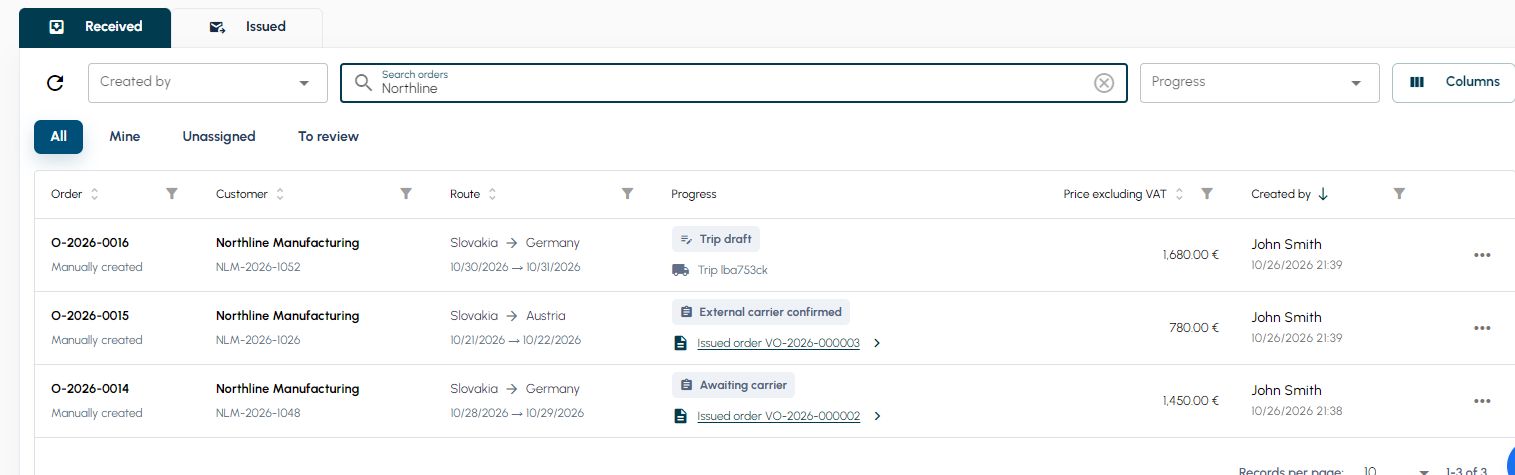
Forwarder example: A freight forwarder arranges transport through external carriers. The team needs to keep the customer request, load, carrier replies, conversations and relevant documents connected while deciding whom to use.
In Moveniq for forwarders, the shared workspace keeps loads, enquiries, carrier responses, conversations, partner details and relevant documents together. This helps a colleague check the latest reply and continue the work without first finding the person who handled the enquiry.
When ERP and TMS belong together
Many transport businesses need both systems. The ERP can remain the main place for company-wide order, customer and financial records. The TMS can serve as the daily workspace for planning and coordinating transport.
The important step is to define ownership in plain language. Decide where the order is created, which details move to the other system, where operational changes are made and who handles errors. Also decide whether a change must be copied back or only communicated to the relevant person.
An integration can reduce repeated entry, but it should not be assumed to be universal or automatically two-way. A connection between an internal order system and Moveniq is agreed for the customer’s setup so that orders can become shipment or load drafts. The scope, mapping and handling of changes must be defined for that particular workflow.
Choose around the work, not the acronym
Follow one normal order through the business. Note where it begins, who updates it, how transport changes reach the team and where the final commercial record belongs.
If the existing ERP supports that complete process clearly, it may be enough. If daily transport work depends on calls, inboxes and spreadsheets around the ERP, a TMS can provide the missing operational workspace. If both systems have a clear role, connect them around agreed handover points rather than forcing either one to do every job.