
Many freight forwarders start with Excel. It is familiar, flexible and easy to adapt. When one person handles a small number of transport orders, a well-maintained spreadsheet may be all they need.
Problems usually appear as the business gets busier. More colleagues need the same information, customers change their requirements and carriers send updates throughout the day. Before long, the team spends time checking which version of a spreadsheet is correct.
Moving to a transport management system (TMS) can help. But replacing an active spreadsheet is not simply a matter of copying its contents into new software. The team needs a clear plan for moving ongoing work without missing an important commitment.
When does Excel stop being enough for freight forwarding?
Consider a hypothetical forwarding team arranging several shipments for different customers. A customer calls to change tomorrow's collection date. One colleague updates the main spreadsheet, but another has an older copy open and continues working with the original date.
Both believe their information is correct. The mistake might only become visible when the carrier receives conflicting instructions.
Another problem is understanding what a status actually means. An order marked green might indicate that a carrier has offered a price. Someone else might interpret green as confirmation that the carrier has accepted the transport order.
Neither problem necessarily means the team needs more complicated software. It needs one reliable place for current information and a shared understanding of what each status means.
If one person manages the work and updates are straightforward, Excel may still be sufficient. The reason to change is not that spreadsheets are outdated. It is that maintaining several versions has become harder than managing the transport itself.
Decide what needs to move into the TMS
The safest starting point is the work that is still active. There is rarely a practical reason to recreate every completed shipment before the team can begin using a TMS.
For each active customer order, identify the information colleagues need to continue working:
- Customer details, order reference and latest collection and delivery requirements.
- Cargo information and agreed prices with the customer and carrier, kept clearly separate.
- Current carrier arrangements, outstanding confirmations and the next action.
- Relevant documents and attachments needed to complete the transport.
Do not assume that every spreadsheet entry is accurate. If a carrier's acceptance is unclear, confirm it with the carrier rather than transferring an uncertain status as a fact.
Older spreadsheets can remain accessible as historical records, following the company's normal archiving and retention practices. The immediate priority is making active orders usable.
Choose a clear moment to switch
Moving gradually does not mean maintaining two active systems indefinitely. That creates exactly the problem the team is trying to solve.
Choose a manageable group of active orders and agree when the TMS becomes their primary working record. Before that handover, check each order against the latest customer requirements, carrier agreements and outstanding tasks.
Assign someone responsibility for keeping each order current. During a short comparison period, use the old spreadsheet to verify that nothing important was missed. Once an order has been checked and handed over, make subsequent operational updates in the TMS.
The old spreadsheet should no longer be another place where colleagues edit the same active order.
Check whether the team can work without the old spreadsheet
A successful transfer is not measured by how many rows have been copied. It is measured by whether colleagues can continue their work confidently.
Ask someone who did not perform the transfer to review an active order. Can they find the latest collection date? Do they know whether the carrier has accepted the order? Can they identify the next action and who is responsible?
If they need to open the old spreadsheet to answer these questions, something is still missing or unclear.
Excel can remain useful for temporary calculations and analysis. What matters is that it no longer competes with the TMS as the live record of an order.
How Moveniq supports the transition
For freight forwarders, Moveniq provides a shared operational record for customer transport orders. Colleagues can work with customer references, collection and delivery details, cargo, customer prices, notes, assigned team members and order progress. Issued carrier orders can also be linked to the relevant customer order, with supporting attachments available in the orders workflow.
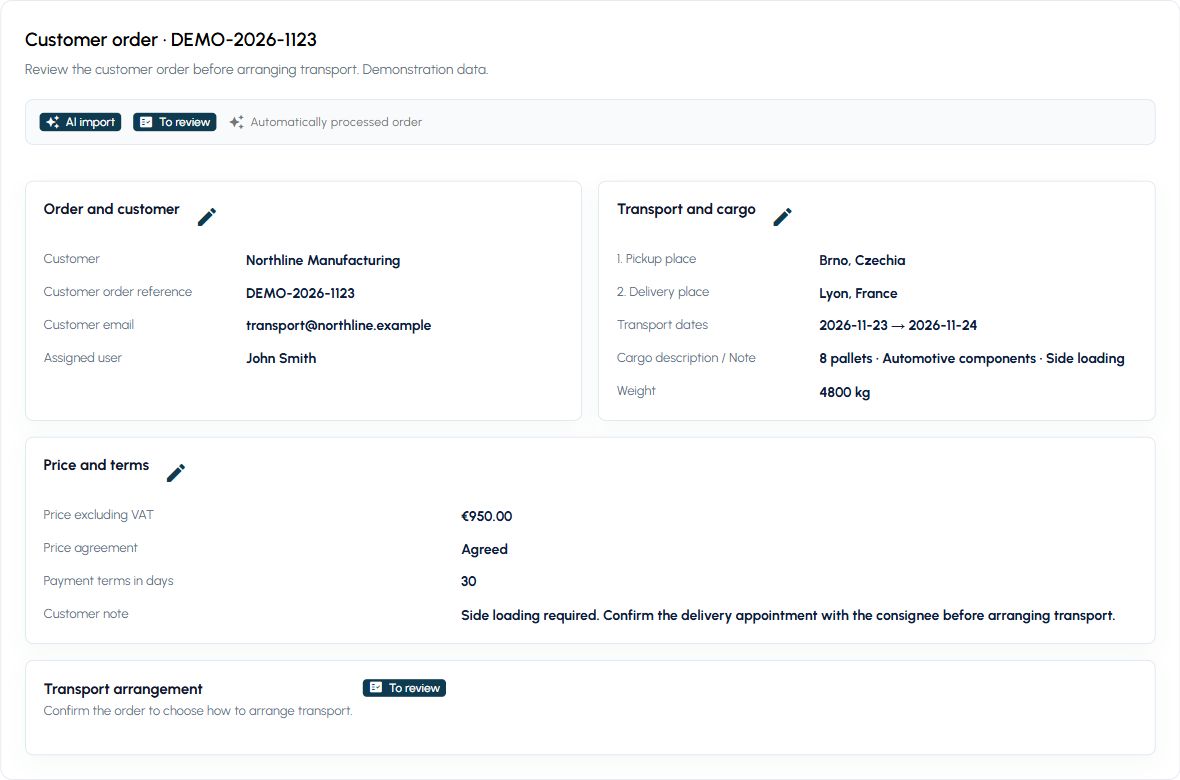
For example, a demo order for Northline Manufacturing contains a shipment from Brno to Lyon, eight pallets weighing 4,800 kg and a customer price of €950. Its note indicates that the delivery appointment still needs confirmation. That outstanding detail remains visible to the team rather than being buried in someone's spreadsheet. Moveniq does not remove the need to verify information or keep records current.
The switch is complete when colleagues know where active work lives, update it in one place and can find the latest requirements and next action without returning to the old spreadsheet.