
A transport order can look perfectly clear on paper and still be entered incorrectly into a transport management system. The problem is not always missing information. Sometimes it is how the information is presented in the document.
Imagine a freight forwarder receives a PDF order from a customer. The document contains two cargo lines: 6 pallets weighing 3,600 kg and another 2 pallets weighing 1,200 kg. Both are to be collected in Brno and delivered to Lyon. Together, they form one transport order for 8 pallets weighing 4,800 kg.
AI can help transfer this information into a working transport order without having to type everything manually. However, knowing which details to check is just as important as extracting them.
Check cargo totals, not just individual lines
Transport orders often contain several cargo lines, subtotals and a final summary. If only the first cargo line is transferred into the working order, the forwarder may start looking for a carrier based on 6 pallets instead of 8.
The opposite mistake is also possible. If the document contains both individual cargo weights and a total weight, adding all these figures together would count the same cargo twice.
Before approaching carriers, the forwarder should compare the recorded quantities with the original document. It is also worth checking the units, particularly when weights are expressed in tonnes rather than kilograms.
Distinguish loading addresses from billing addresses
A customer may have its registered office in Bratislava but operate a warehouse in Brno. Both addresses can appear on the same transport order, even though only one is relevant to the collection.
Simply checking whether an address has been extracted is therefore not enough. The forwarder needs to check what that address represents.
In our example, the carrier needs to collect the goods in Brno and deliver them to Lyon. The customer's billing address in Bratislava does not belong on the transport route. Using it as the collection address could lead to an incorrect transport price or unnecessary kilometres.
Pay attention to time windows and special instructions
Suppose the customer specifies collection on 26 November 2026 between 08:00 and 12:00, with delivery on 27 November 2026. The collection window does not mean that loading is booked for 08:00. Likewise, the delivery date alone does not confirm an unloading appointment.
Important instructions can also appear at the bottom of the document rather than alongside the addresses or cargo details.
In our example, the footer contains two requirements:
- The vehicle must allow side loading.
- The driver must call the consignee 30 minutes before arrival.
The first affects which vehicles are suitable for the transport. The second affects what the driver needs to do before delivery, but does not establish a delivery appointment. Both instructions need to reach the carrier.
Check whether the PDF contains one order or several
A document with several pages may contain a single transport order with additional cargo details and instructions. It may also contain several separate orders.
Checking customer references, collection points and delivery points helps the forwarder establish which information belongs together. Combining separate orders could create a transport that the customer never requested.
Document quality matters too. If a scanned PDF contains unreadable figures or addresses, requesting a clearer copy or asking the customer for confirmation is better than working with uncertain information.
Using AI to prepare transport orders for review
In Moveniq's TMS for freight forwarders, AI can extract information from a supplied PDF and prepare a saved customer transport order for review. The original document remains attached to the order. The forwarder can compare the extracted dates, addresses, cargo quantities and instructions with the source document and correct any missing or inaccurate information before using the order to arrange transport.
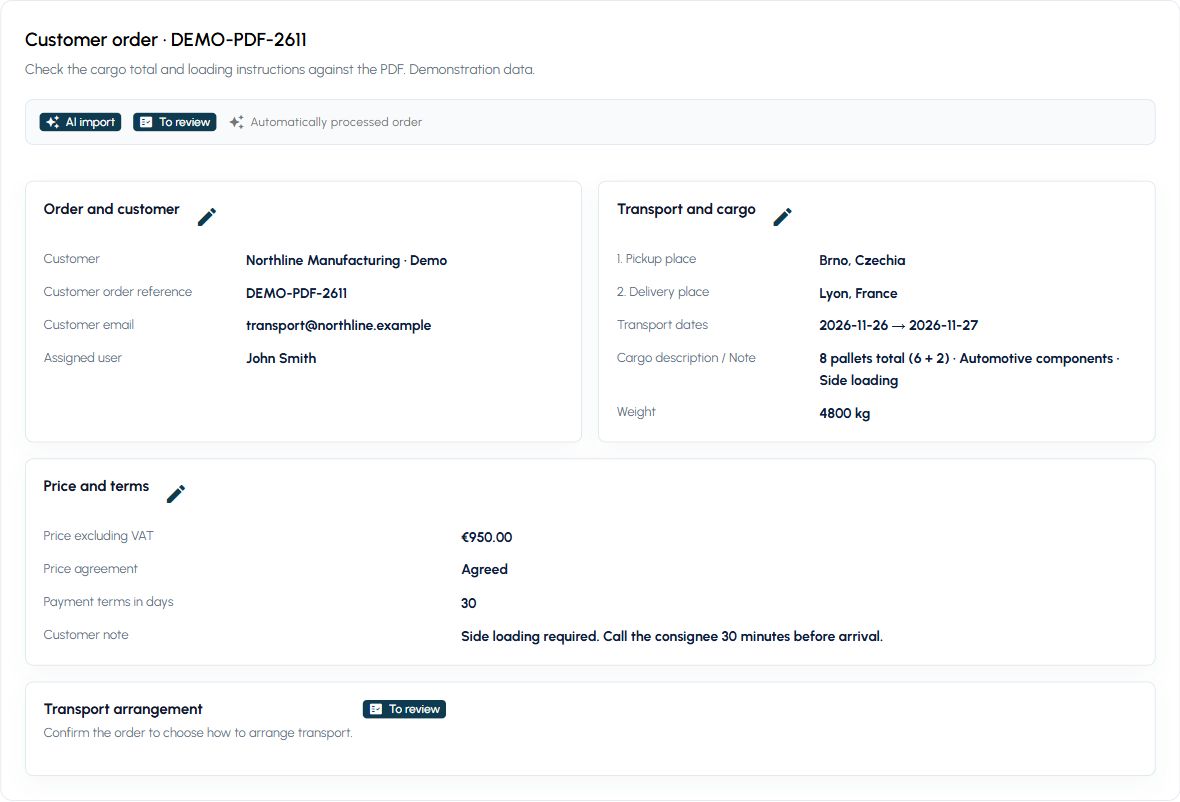
The aim is to spend less time retyping information and more time checking the details that matter. In our example, that means confirming all 8 pallets, the total weight of 4,800 kg, the correct collection and delivery addresses, the requested dates and the special instructions.
Once the working order matches the customer's document and any outstanding questions have been resolved, the forwarder has a reliable basis for approaching carriers and arranging the transport.