
The customer asks for proof that a load was delivered. The carrier says the documents were sent yesterday, but the forwarder finds them in another email thread. The attachment is a phone photo, and the bottom of the page is missing.
The transport is operationally complete, but the document work is not. A file may have arrived without being readable, complete or connected to the right job. If nobody checks it, the problem often appears only when the customer asks for it.
A useful process is simple: receive the file, match it to the correct transport, open and check it, save the usable version and follow up on anything missing.
Received does not mean ready to use
A filename or attachment icon only proves that a file exists. It does not show whether the scan is readable or whether every relevant page is present.
Open the document when it arrives. Check that names, references, places and dates can be read. Look for any acknowledgement expected under the agreed process, as well as remarks or exceptions recorded on the document. Do not judge the file only by its name or by the presence of a signature.
In road freight, a CMR usually means the road consignment note used with the shipment. POD means proof of delivery. Teams often use these terms when asking for documents, but the exact documents required depend on what the customer, forwarder and carrier agreed for that job.
Match the file before you store it
A document can be perfectly readable and still belong to the wrong transport. Before filing it, compare the carrier order or customer reference, route and relevant dates with the job you are handling.
This matters when the same carrier completes several loads on the same lane. A Brno–Lyon scan from last week may look convincing at first glance but provide no answer for today’s customer.
A clear filename helps. For example, IO-2026-0042_CMR_Brno-Lyon_complete.pdf is easier to recognise than IMG_4837.pdf. The name still does not prove that the contents have been checked. It only makes the correct file easier to find.
Check the document itself
Readability is only one part of the check. Confirm that all relevant pages are included and that the scan has not cut off text, stamps or remarks. If a second page forms part of the document, make sure it is present.
Do not clean up the record by removing inconvenient remarks or changing its contents. If something is unclear, ask the carrier for a better copy or an explanation. Keep the version received separate from any corrected or more complete version so colleagues can tell them apart.
Agree which documents are needed for each customer and job. A familiar route does not mean that every customer expects the same set of files.
Give each missing item an owner
Consider this hypothetical example. Petra arranged a Brno–Lyon transport under carrier order IO-2026-0042. The load was delivered on 17 November. A scan arrived on 18 November, but the bottom of the page was cut off.
Petra checks the order reference and route, then opens the file. She asks the carrier for a complete, readable copy, including the second page if it forms part of the document. She keeps the first file distinct from the corrected version.
In the team’s working record, Petra notes who requested the replacement and when the team should follow up. Until the complete copy arrives and someone checks it, the document remains unresolved.
Send the customer the right document, not every file
A customer document pack should contain the documents relevant to that customer and transport. It should not be a dump of every file held by the forwarding team.
Check the recipient and attachments before sending. Keep internal information, such as the carrier’s price, separate from customer communication. Saving a document internally does not notify the customer, and it does not mean anyone has sent or accepted it.
If an agreed document is still missing, say what is available and what is being followed up. A clear answer is better than forwarding an unreadable scan simply because it was the first file received.
Where Moveniq helps keep the files with the order
In Moveniq for freight forwarders, authorised colleagues can keep attachments with the issued carrier order. The source order number and route help them choose the correct record, while the original filename, upload date, uploader and source help distinguish received versions.
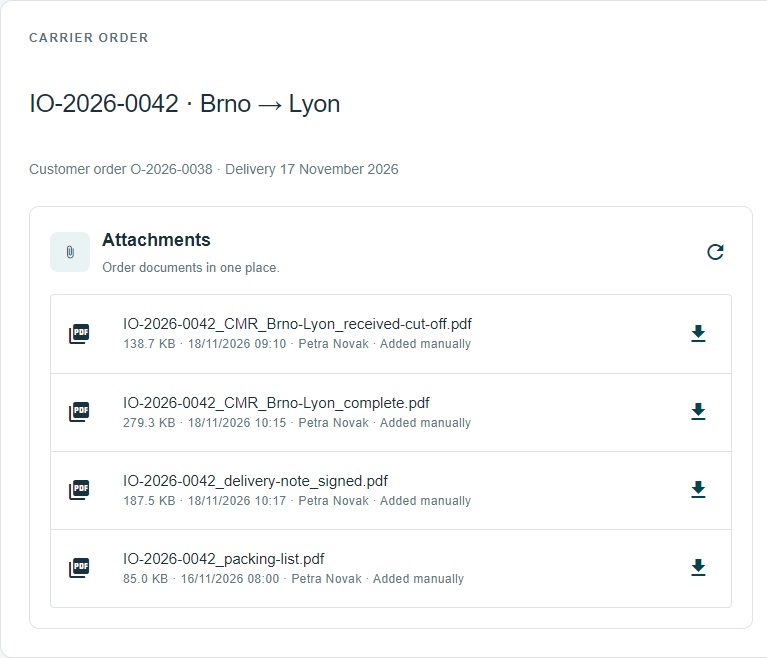
The forwarder still opens each file and checks its contents. Moveniq does not turn an uploaded attachment into proof that the document is complete, correct or ready for the customer.
Keeping the received and corrected copies with the right carrier order gives the team a clearer starting point. Uploading a file alone does not send it to the customer or issue another carrier email.
The practical test is straightforward. When the customer asks for delivery proof, can the forwarder find the correct readable document without searching several inboxes or calling three colleagues? That is when keeping the documents together starts to save the team work.